Alternatives · 7 min read
Best Murf AI Alternatives (2026): 5 AI Voice Generators Compared
Murf AI alternatives for voiceovers in 2026: ElevenLabs, WellSaid, Speechify Studio, Descript, and HeyGen compared on pricing, commercial rights, and cloning.
The best AI tools for YouTubers in 2026, organized by workflow: research, scripting, voice, avatars, editing, and clips. Prices checked from official sites.
This post may contain affiliate links. We may earn a commission at no extra cost to you. Read our affiliate disclosure.
Editorial illustration—not a product screenshot or evidence of hands-on testing.
Running a YouTube channel means working as a researcher, writer, narrator, editor, and marketer all at once. AI tools won't replace your ideas or your personality, but they can cut hours from the boring parts: finding topics, drafting outlines, recording clean narration, editing out mistakes, and turning long videos into Shorts.
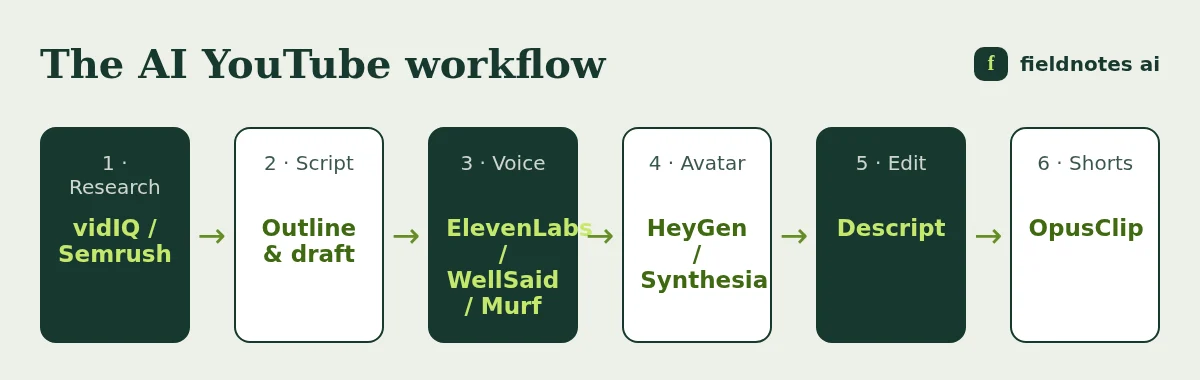
This is our hub page for AI tools for YouTubers in 2026. It is organized by workflow stage, so you can build a stack that fits your channel and budget. Each section links to our deeper guides. It is research-based. We compared official pricing and feature pages, checked October 30–31, 2026, and did not run hands-on tests. Prices change often, so confirm them on each vendor's site.
Disclosure: AI Tool Fieldnotes may earn a commission if you buy through links on this page. It costs you nothing extra and does not change our conclusions.
A lean faceless stack (vidIQ Boost + ElevenLabs Creator + Descript Hobbyist) costs roughly $57/month on monthly and annual list prices combined. Check current pricing for your exact total.
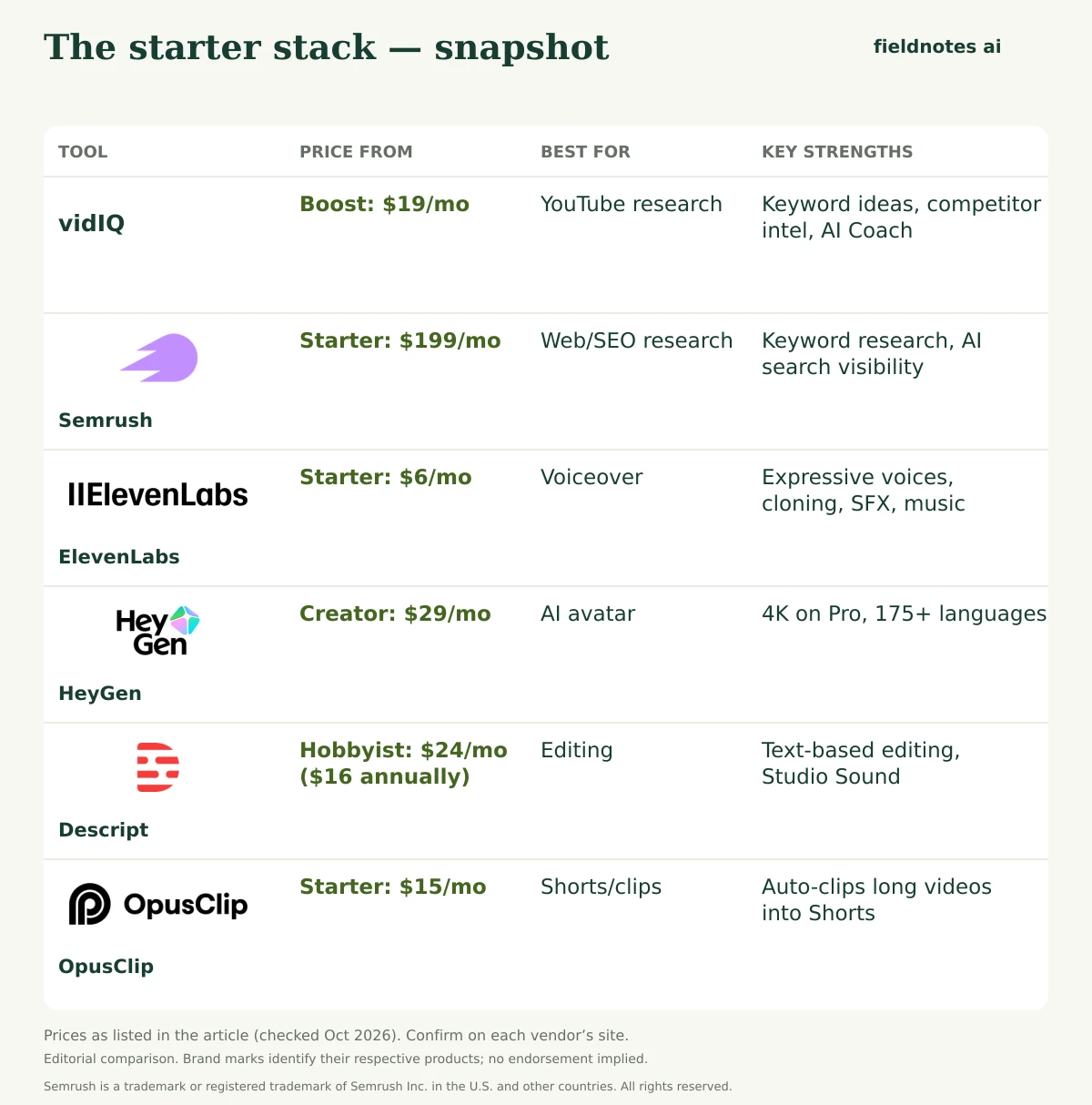
Visit ElevenLabs Paid link · We may earn a commission.| Workflow stage | Tool | Free option | Entry paid price | Why it's here |
|---|---|---|---|---|
| YouTube research | vidIQ | Yes (150 AI credits/mo) | Boost: $19/mo or $199/yr | Keyword ideas, competitor intel, AI Coach |
| Web/SEO research | Semrush | Free plan + 7-day trial | Starter: $199/mo ($165.17 annually) | Keyword research, AI search visibility |
| Voiceover | ElevenLabs | 10k credits/mo (no commercial) | Starter: $6/mo | Expressive voices, cloning, SFX, music |
| Voiceover (minutes) | WellSaid | 3 download min/mo | $10/mo billed annually | Predictable English narration |
| Voiceover (studio) | Murf | Free trial offered | Check current pricing | Guided voiceover editor |
| AI avatar | HeyGen | 3 videos/mo, 1 min each | Creator: $29/mo ($24 annually) | 4K on Pro, 175+ languages |
| AI avatar (budget) | Synthesia | Basic: 10 min/mo | Starter: $19/mo ($14 yearly) | Clean explainer presenters |
| Editing | Descript | 60 media min/mo | Hobbyist: $24/mo ($16 annually) | Text-based editing, Studio Sound |
| Shorts/clips | OpusClip | Check current pricing | Starter: $15/mo | Auto-clips long videos into Shorts |
vidIQ is built specifically for YouTube. Its official plans page lists Free ($0), Boost ($19/month or $199/year), and Max ($49/month or $468/year) for one channel, as US list prices. vidIQ's help center lists monthly AI credits of 150 on Free, 2,000 on Boost, and 6,000 on Max. Unused credits don't roll over. Boost includes 30+ advanced tools, such as personalized keyword ideas, optimization suggestions, competitor intel, and an AI Coach. vidIQ also says its MCP connection is available on every plan.
Best for: finding video topics with demand and checking titles before you publish.
If your channel supports a website, blog, or affiliate site, Semrush helps you research Google keywords and see how AI search tools mention your brand. Starter is $199/month ($165.17/month billed annually), and there's a 7-day free trial. Read our Semrush review for beginners for how the trial works.
Semrush · Link coming soonGeneral AI chat assistants can help with outlines, hooks, and rewrites. vidIQ also lists a Script Writer among its credit-based AI tools. Whatever you use, add your own research, opinions, and examples. YouTube's monetization policies target repetitive and inauthentic content, and original insight is what keeps viewers watching.
For blog posts that support your videos, content optimizers can help. See Surfer SEO vs Frase.
Faceless channels live or die on narration quality.
Our full ranking is in best AI voice generator for YouTube. For a direct comparison, see ElevenLabs vs Murf, and for more options, see Murf AI alternatives.
Visit ElevenLabs Paid link · We may earn a commission.If you don't want to appear on camera, an AI avatar can host your videos.
Read our best AI avatar video generator for YouTube ranking, our HeyGen vs Synthesia comparison, and our Synthesia alternatives.
HeyGen · Link coming soonDescript lets you edit video by editing its transcript, remove filler words, clean audio with Studio Sound, and create clips.
Plans (checked Oct 31, 2026):
Best for: talking-head creators and podcasters who publish on YouTube.
OpusClip turns long videos into short vertical clips. Its official pricing page listed Starter at $15/month and Pro at $29/month, or $14.50/month when Pro is billed annually. OpusClip's help pages describe a processing-minute and credit system, and Pro adds team workspaces and scheduling. Free plan details and credit amounts can change, so check current pricing.
Best for: squeezing more reach out of every long-form upload.
Faceless explainer channel (budget)
Faceless channel with a presenter
Talking-head creator
Creator with a blog or affiliate site
All totals are list prices from October 2026. Taxes and promotions vary.
Pros
Cons
There isn't one tool that does everything. For most creators, the highest-impact pair is a research tool (vidIQ) and a voice or editing tool (ElevenLabs or Descript), depending on whether you appear on camera.
Yes. vidIQ, ElevenLabs, Descript, HeyGen, and Synthesia all have free plans or free tiers, though free tiers often add watermarks or exclude commercial rights (checked October 2026).
They can, provided you have commercial rights and follow YouTube's policies, including disclosure of realistic altered or synthetic content and the rules on repetitive content. Check YouTube's current policies.
A lean stack can start around $20–60 a month. Adding avatars, Semrush, or higher tiers can push it past $100–300. Start on free plans and upgrade only the tool that becomes your bottleneck.
Not for YouTube alone. vidIQ is YouTube-focused. Semrush makes sense if you also run a website or want Google and AI search visibility data.
The best AI tools for YouTubers in 2026 are the ones that remove your biggest bottleneck. For research, use vidIQ. For voice, use ElevenLabs. For an AI presenter, use HeyGen. For editing, use Descript, and for Shorts, use OpusClip. Add Semrush if you have a website. Start free, test with your own scripts, and keep your own perspective at the center of every video.
Prices were checked October 30–31, 2026 on official sites. Check current pricing before subscribing.
HeyGen · Link coming soonUse these vendor pages to confirm current prices, billing periods, export rights, and limits before buying. They are reference links, not affiliate links. Prices and availability can change after the article’s stated research date; a link here does not mean every current claim has been independently retested.
Our editorial method explains the difference between document-based research and hands-on testing.
Murf AI alternatives for voiceovers in 2026: ElevenLabs, WellSaid, Speechify Studio, Descript, and HeyGen compared on pricing, commercial rights, and cloning.
The best AI voice generators for YouTube in 2026: ElevenLabs, Murf, WellSaid, HeyGen, compared on pricing, commercial rights, and fit. Checked Oct 2026.

The best AI avatar video generators for YouTube creators in 2026: HeyGen, Synthesia, Colossyan, D-ID, and Descript compared on price, export quality, and limits.