Best tools · 7 min read
Best AI Tools for YouTubers (2026): The Complete Creator Stack
The best AI tools for YouTubers in 2026, organized by workflow: research, scripting, voice, avatars, editing, and clips. Prices checked from official sites.
The best AI voice generators for YouTube in 2026: ElevenLabs, Murf, WellSaid, HeyGen, compared on pricing, commercial rights, and fit. Checked Oct 2026.
This post may contain affiliate links. We may earn a commission at no extra cost to you. Read our affiliate disclosure.
Editorial illustration—not a product screenshot or evidence of hands-on testing.
Faceless channels, tutorial channels, documentary-style explainers, Shorts: a big share of YouTube now runs on AI narration. The right voice generator can save you hours of recording and re-recording. The wrong one can make your channel sound cheap, or leave you without the commercial rights you need to monetize.
This guide is research-based. We did not run long hands-on tests. We compared official pricing and plan pages, all checked on October 30, 2026, and ranked tools by how well they fit typical YouTube workflows. Prices change often, so check current pricing before you subscribe.
Disclosure: Some links are affiliate links. We may earn a commission at no extra cost to you.
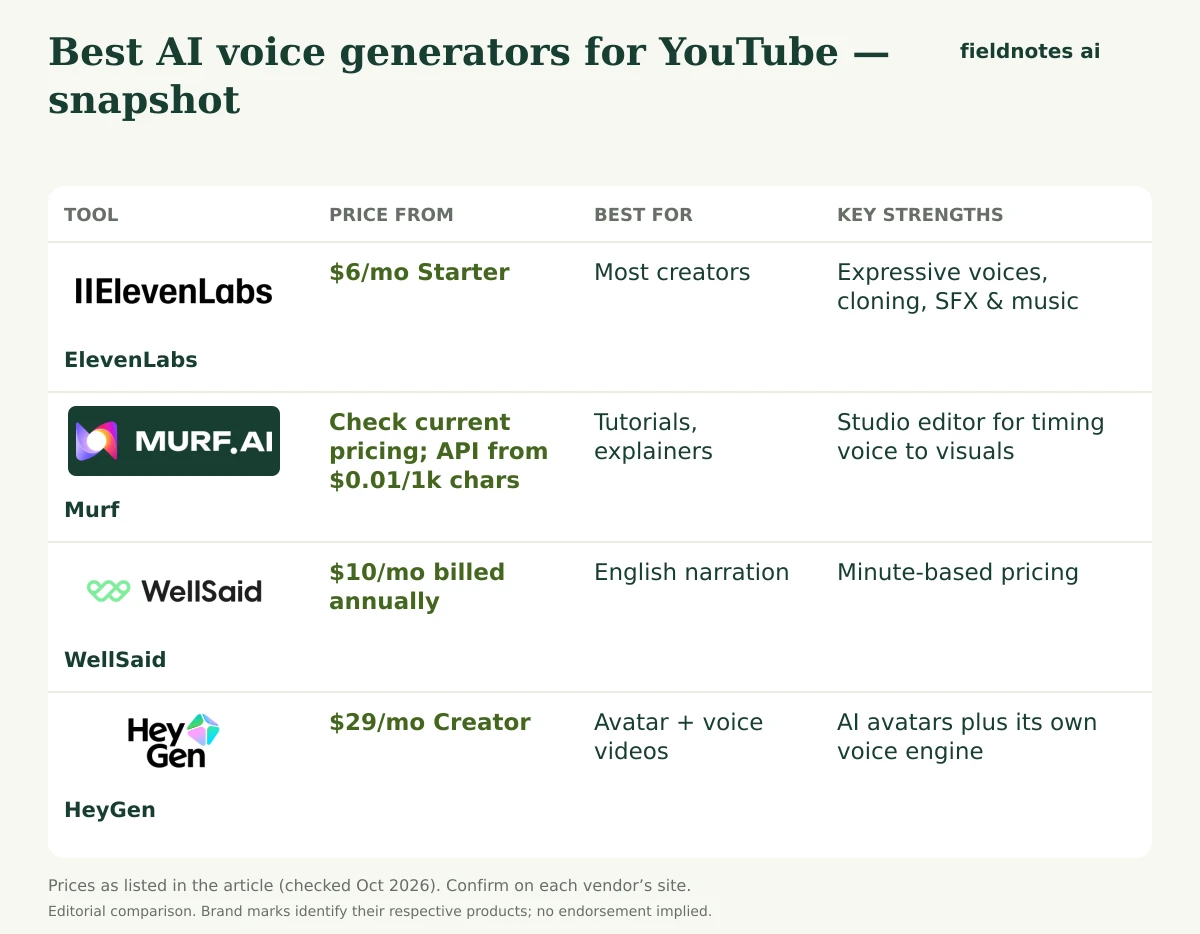
Before comparing tools, here's what we weighed:
| Tool | Free option | Entry paid price | How usage is measured | Commercial use | Voice cloning | Best for |
|---|---|---|---|---|---|---|
| ElevenLabs | 10k credits/mo (no commercial license) | $6/mo Starter | Credits (~1 per character for TTS) | From Starter | Instant (Starter+), Professional (Creator+) | Most creators |
| Murf | Free trial offered | Studio: check current pricing; API from $0.01/1k chars | Characters (API) | Check plan terms | Check current plans | Tutorials, explainers |
| WellSaid | 3 download min/mo (no commercial rights) | $10/mo billed annually ($19 monthly) | Downloaded minutes | Full commercial rights on paid plans | Check current plans | English narration |
| HeyGen | 3 watermarked videos/mo | $29/mo Creator ($24 annually) | Credits | Paid plans | Yes, with custom avatar | Avatar + voice videos |
All prices were checked October 30, 2026, on each tool's official pricing page.
ElevenLabs is the most complete AI audio platform we researched. For YouTube, the standout points are expressive models (its newest, Eleven v4, is billed as its "most emotive model yet"), 74 supported TTS languages, voice cloning, and extras such as sound effects and music, all drawing from one credit pool.
Pricing (Oct 30, 2026):
ElevenLabs estimates roughly 30 minutes of TTS per month on Starter and about 121 on Creator. Unused credits roll over for up to two months while you're subscribed.
Pros: natural, emotional voices; cloning; SFX and music for B-roll; transparent pricing; cheap entry. Cons: shared credits drain quickly if you also dub or make music; no commercial use on Free.
YouTube fit: A weekly 10-minute video is roughly 40 minutes of narration a month, before retakes. The Creator plan (~121 minutes) covers that comfortably. Starter (~30 minutes) suits Shorts or one long video a month.
Visit ElevenLabs Paid link · We may earn a commission.Murf is a voiceover studio built around a script-and-timeline editor. You can match narration to slides or footage and adjust pacing line by line, which makes it a natural fit for tutorial, education, and software-walkthrough channels.
Pricing (Oct 30, 2026): Murf's API pricing was clearly listed:
Murf's Studio subscription prices did not load on our check date, so check current pricing on murf.ai. Murf lists HIPAA, GDPR, ISO 27001, and SOC 2 Type II compliance.
Pros: editor built for syncing voice to visuals; very low API rates; strong compliance. Cons: we couldn't verify Studio plan prices; fewer bundled creative extras than ElevenLabs.
YouTube fit: A 10-minute script is about 1,300–1,500 words, or roughly 8,000–9,000 characters. On the studio-quality API rate, that's well under $1 of characters. Still, most creators will use the Studio app instead, so check its plan pricing.
Murf · Link coming soonWellSaid focuses on polished, professional English voices and sells downloaded minutes instead of characters. Generation is unlimited on paid plans, so you can redo lines freely and only pay when you download.
Pricing (Oct 30, 2026):
Paid plans include full commercial rights, all English voices, and caption files. Higher plans offer up to 48 kHz audio.
Pros: predictable minute-based pricing; unlimited regeneration; commercial rights; caption files help with YouTube subtitles. Cons: English-only below Enterprise; the cheapest annual plan's 240 minutes/year is only about 20 minutes a month.
WellSaid · Link coming soonHeyGen is an AI avatar video platform, not a pure voice tool. It includes HeyGen Voice, with up to about 10 hours of text to speech on Creator and 16+ hours on Pro, plus 1,000+ AI voices and voice cloning. If your channel would benefit from a presenter (a custom avatar of you or a stock one), HeyGen covers voice and video together.
Pricing (Oct 30, 2026):
Pros: voice and avatar in one; 4K on Pro; big language list; credit rollover. Cons: more expensive if you only need audio; credit costs vary by model.
HeyGen · Link coming soon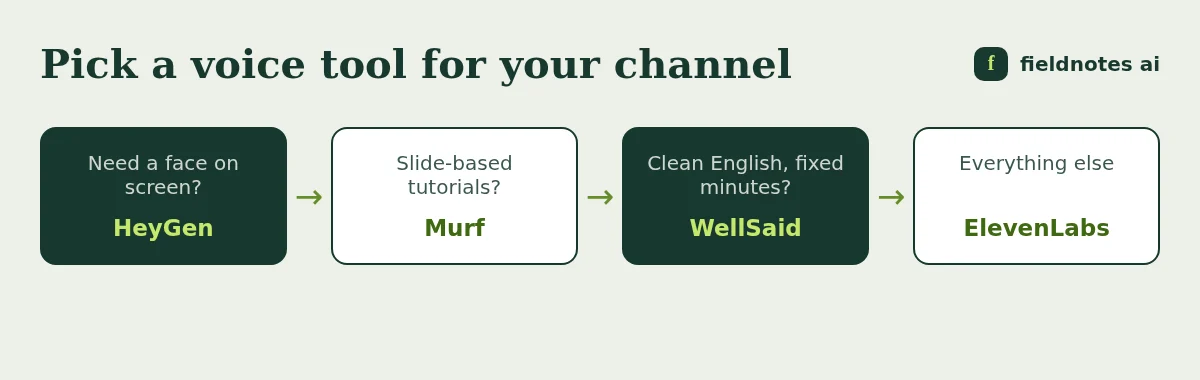
Generally, AI narration can appear in monetized videos if you have the commercial rights and your content follows YouTube's policies, including its rules on repetitive or low-value content. Check YouTube's current monetization policies and your voice tool's license.
Naturalness is subjective, and we didn't run blind listening tests. ElevenLabs is widely known for expressive voices. Test your own script on the free options before paying.
Among the tools here, the free plans of ElevenLabs and WellSaid do not include commercial rights (as of October 30, 2026). Commercial use starts with paid plans.
Roughly speaking, at about 150 spoken words per minute, a 10-minute video needs about 1,500 words. Multiply by your monthly uploads and add 20–30% for retakes.
It can keep your channel's identity consistent while saving recording time. ElevenLabs offers instant cloning from $6/month and professional cloning from $22/month. HeyGen also includes voice cloning.
For most YouTubers, ElevenLabs is the best AI voice generator to start with. It has expressive voices, cloning, extras for sound design, and a clear path from free to the $22 Creator plan. Murf suits tutorial channels, WellSaid suits clean English narration on a minute-based budget, and HeyGen is the pick when you want an AI presenter as well as a voice.
All prices and features were checked on October 30, 2026. Murf's Studio pricing couldn't be confirmed that day. Check current pricing on each official site before subscribing.
Visit ElevenLabs Paid link · We may earn a commission.Use these vendor pages to confirm current prices, billing periods, export rights, and limits before buying. They are reference links, not affiliate links. Prices and availability can change after the article’s stated research date; a link here does not mean every current claim has been independently retested.
Our editorial method explains the difference between document-based research and hands-on testing.
The best AI tools for YouTubers in 2026, organized by workflow: research, scripting, voice, avatars, editing, and clips. Prices checked from official sites.
Murf AI alternatives for voiceovers in 2026: ElevenLabs, WellSaid, Speechify Studio, Descript, and HeyGen compared on pricing, commercial rights, and cloning.
ElevenLabs vs Murf compared on pricing, voice cloning, API costs, and workflow. A research-based guide with prices checked October 2026.