
Best tools · 8 min read
Best AI Avatar Video Generator for YouTube (2026)
The best AI avatar video generators for YouTube creators in 2026: HeyGen, Synthesia, Colossyan, D-ID, and Descript compared on price, export quality, and limits.
Looking for a Synthesia alternative? We compare HeyGen, Colossyan, D-ID, and Descript on pricing, avatars, and use cases. Research-based, plans checked October 2026.
This post may contain affiliate links. We may earn a commission at no extra cost to you. Read our affiliate disclosure.

Editorial illustration—not a product screenshot or evidence of hands-on testing.
Synthesia is one of the best-known AI avatar video platforms. Businesses use it to turn a script into a presenter-led video for training, onboarding, and internal updates. It is polished, it takes compliance seriously, and it has a free Basic plan. It is not the right fit for everyone, though. Creators often want longer videos, more generative features, or a lower price per minute. Small teams sometimes want SCORM export without moving to an Enterprise contract.
This guide covers the strongest Synthesia alternatives in 2026 and who each one suits. It is research-based. We did not run long hands-on tests. We read each vendor's official pricing and help pages on October 30–31, 2026 and compared what they publish. AI video pricing changes often, so confirm every number on the vendor's site before you pay.
Disclosure: AI Tool Fieldnotes may earn a commission if you buy through links on this page. It costs you nothing extra and does not change our conclusions.
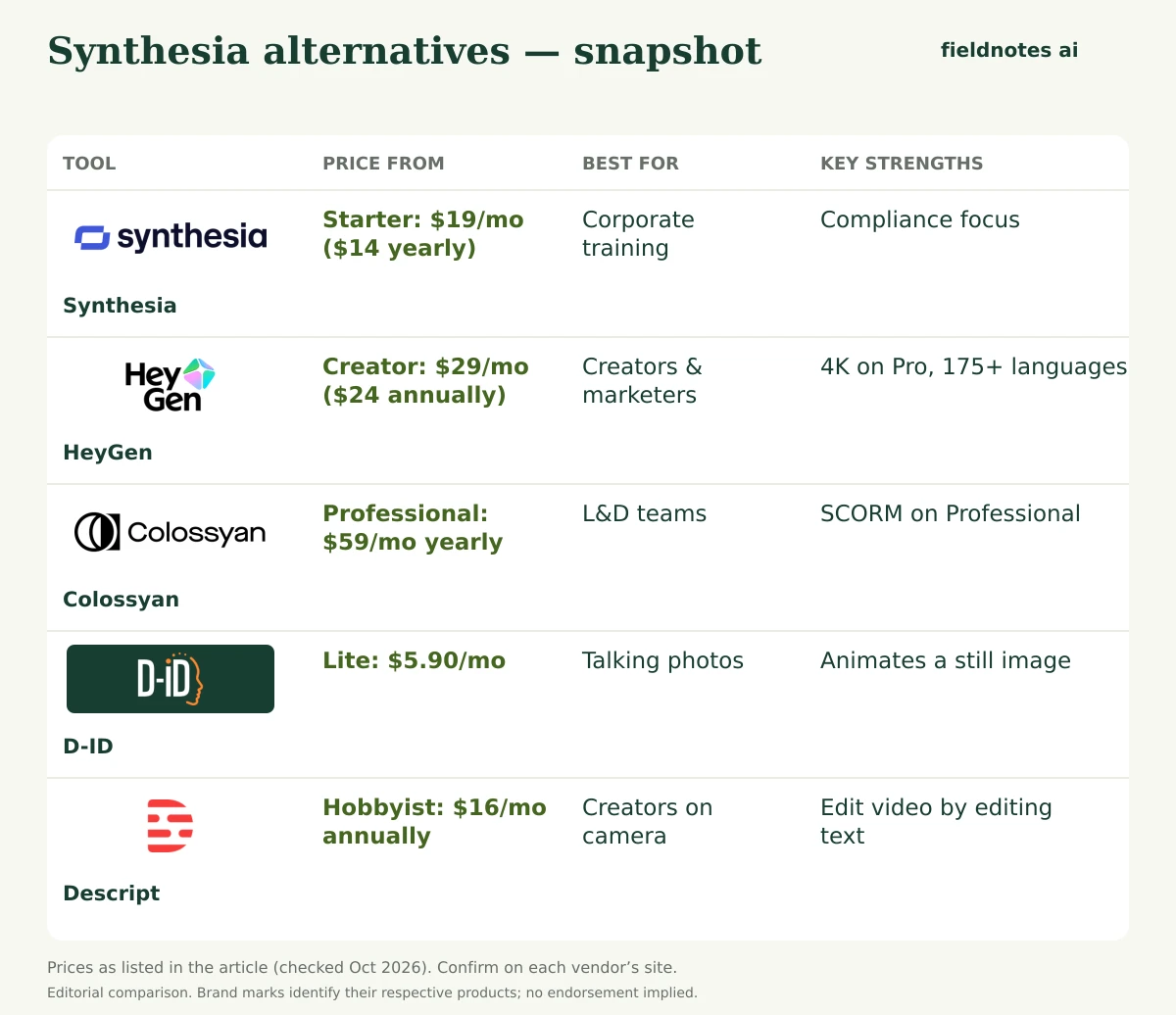
Prices are US list prices from official pages, checked October 30–31, 2026.
| Tool | Free option | Entry paid plan | Best for | Standout feature |
|---|---|---|---|---|
| Synthesia | Basic: 10 min/month, watermark | Starter: $19/mo monthly; $14/mo billed yearly | Corporate training, internal comms | Business-first workflow, compliance focus |
| HeyGen | 3 watermarked videos/mo, up to 1 min each | Creator: $29/mo ($24/mo annually) | Creators and marketers | 4K on Pro, 175+ languages, credit rollover |
| Colossyan | Starter: 20 min/mo (NEO), branding | Professional: $89/mo monthly; $59/mo billed yearly | L&D teams | SCORM exports on Professional |
| D-ID | 14-day free trial | Lite: $5.90/mo (personal use) | Talking photos, short clips | Animates a still image |
| Descript | Free plan, 60 media minutes/mo | Hobbyist: $24/mo monthly; $16/mo annually | Creators who record themselves | Edit video by editing text |
Based on Synthesia's published plans, these are the usual reasons people shop around:
For a deeper head-to-head of the two market leaders, read our HeyGen vs Synthesia comparison.
HeyGen calls itself an AI video generator for creators and businesses. Its pricing page lists several avatar engines (Avatar III, IV, and V), a Video Agent that builds videos from prompts, its own voice engine, and access to third-party generative models on higher plans.
Pricing (checked Oct 30, 2026):
Pros
Cons
Who it's for: creators, marketers, agencies, and small businesses that want one tool for avatars, translation, and generative video.
HeyGen · Link coming soonColossyan targets the same training market as Synthesia. Its pricing page leads with course creation, interactive videos, a multilingual player, and SCORM.
Pricing (checked Oct 31, 2026):
Colossyan says yearly plans get all their minutes upfront. Monthly minutes expire at the end of each month.
Pros
Cons
Who it's for: instructional designers and HR teams who want SCORM without an enterprise contract.
D-ID's Creative Reality Studio animates a still photo or avatar from a script or audio. It also sells a separate developer API.
Pricing (checked Oct 31, 2026): D-ID's help center lists a 14-day free trial, followed by Lite, Pro, Advanced, and Enterprise Studio plans. The Studio pricing page showed Lite at $5.90/month and Pro at $29/month. Lite is for personal use only and adds a D-ID logo to exports. Commercial use starts on Pro. Advanced is a higher-volume tier. Third-party trackers have reported different Advanced prices, so check current pricing on D-ID's site.
D-ID's FAQ says standard presenters export at up to 1280×1280. Premium (HQ) presenters export at 1080p on Trial, Pro, Advanced, and Enterprise.
Pros
Cons
Who it's for: social media posts, quick explainers, and developers building interactive agents.
Descript is not an avatar-first tool. It is a video and podcast editor where you edit by editing a transcript. It still covers much of what people use Synthesia for: AI voice from a script, voice clones, dubbing, and, on Business, custom avatars from a photo or text.
Pricing (checked Oct 31, 2026):
Pros
Cons
Who it's for: YouTubers, podcasters, and marketers who record real footage and want AI to speed up editing.
Here is a quick reminder of Synthesia's own plans (checked Oct 30, 2026). Basic is free, with 10 minutes of video a month and a watermark. Starter is $19/month billed monthly or $14/month billed yearly, with 125+ avatars. Pro is $89/month billed monthly or $59/month billed yearly, with 180+ avatars and 5 personal avatars. Enterprise has custom pricing, SSO, SCORM, and 140+ languages.
If your organization values a single vendor with a strong compliance and moderation story, Synthesia remains a safe choice.
Synthesia · Link coming soonThe avatar is only half the video. If you plan to narrate B-roll or slides without a presenter, a dedicated voice tool may be cheaper. See our best AI voice generator for YouTube roundup, our ElevenLabs review, and our Murf AI alternatives guide.
Colossyan's free Starter plan lists 20 minutes a month with its NEO model, which was the most generous free minute allowance we found (checked October 31, 2026). HeyGen's free plan gives 3 videos a month, but each is capped at 1 minute.
It depends on the use case. HeyGen leans toward creators and marketing, with 4K, long videos, and generative models. Synthesia leans toward corporate training. Our HeyGen vs Synthesia guide goes deeper.
Colossyan Professional lists 5 SCORM exports a month. HeyGen lists SCORM export on its Business plan. With Synthesia, SCORM appears on Enterprise.
Paid plans generally include commercial use, but terms vary. For example, D-ID's Lite plan is for personal use only. Read each license before publishing.
D-ID Lite is cheaper at $5.90/month, but it is for personal use and has small minute limits. Free plans from Colossyan, HeyGen, and Descript also let you start at $0.
For most people leaving Synthesia, HeyGen is the strongest all-round alternative. Colossyan is the value pick for training teams that need SCORM, D-ID is the budget option for talking photos, and Descript suits creators who appear on camera. Synthesia is still a solid choice for enterprises that value its compliance features.
All prices were checked on October 30–31, 2026. Check current pricing on each official site before subscribing.
HeyGen · Link coming soonUse these vendor pages to confirm current prices, billing periods, export rights, and limits before buying. They are reference links, not affiliate links. Prices and availability can change after the article’s stated research date; a link here does not mean every current claim has been independently retested.
Our editorial method explains the difference between document-based research and hands-on testing.
The best AI avatar video generators for YouTube creators in 2026: HeyGen, Synthesia, Colossyan, D-ID, and Descript compared on price, export quality, and limits.
The best AI tools for YouTubers in 2026, organized by workflow: research, scripting, voice, avatars, editing, and clips. Prices checked from official sites.
Murf AI alternatives for voiceovers in 2026: ElevenLabs, WellSaid, Speechify Studio, Descript, and HeyGen compared on pricing, commercial rights, and cloning.